

Mostly it's the upscaling. A base PS5 renders GTA 6 at 1440p and rebuilds the image with Rockstar's TAA, so foliage, distant buildings and some reflections look fuzzy or noisy, especially in motion. The game has no film grain, sharpening or resolution option. What helps: Motion Blur Strength at 0 or 1, TV sharpening and noise reduction off or low, motion smoothing off, Game mode on, PS5 resolution on Automatic and a proper HDR calibration. Only the PS5 Pro gets a sharper image.
Step by step
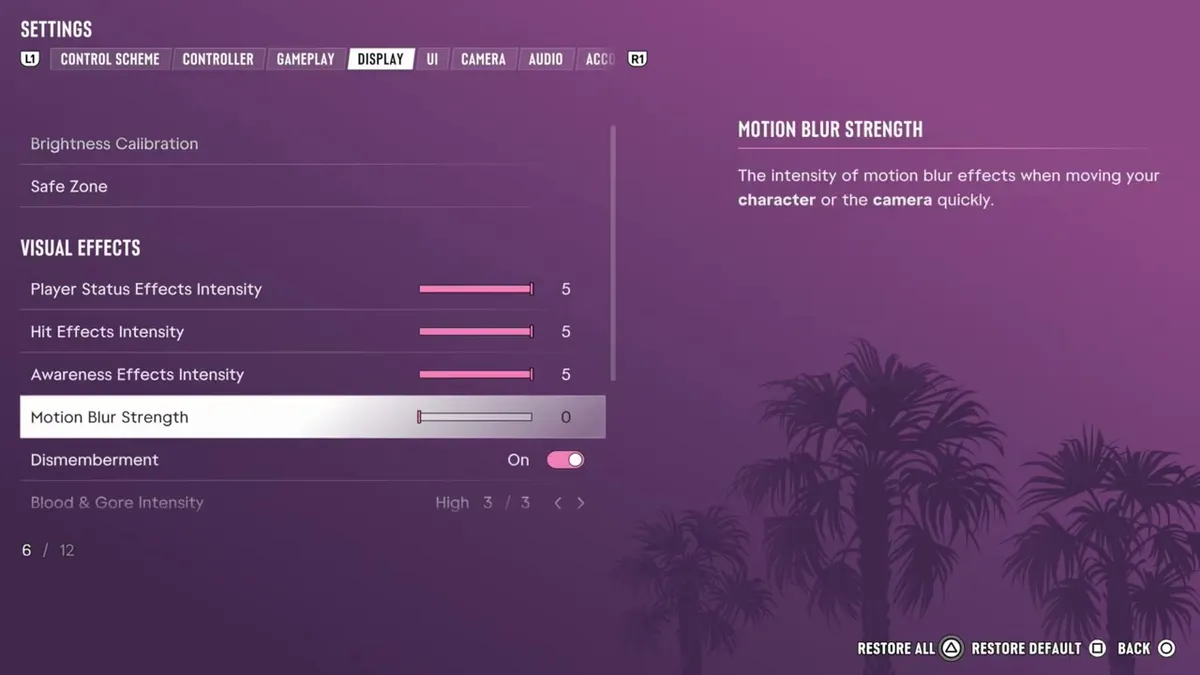
- In GTA 6, set Display > Visual Effects > Motion Blur Strength to 0 or 1.
- On the PS5, go to Settings > Screen and Video > Video Output and leave Resolution on Automatic.
- Set HDR to On When Supported and run Adjust HDR, then Display > HDR Calibration in the game.
- On the TV, pick Game mode and switch off motion smoothing.
- Turn TV sharpness down and switch noise reduction off or to low.
- If the grain appeared suddenly, close GTA 6 fully and start it again.
Why does the picture look grainy?
Because of how the base PS5 builds each frame. It renders GTA 6 at 1440p and upscales it with Rockstar’s own TAA, which blends detail from several frames. Fine, busy detail is where that shows: palm fronds and grass break up, distant buildings go fuzzy, and some reflections on rough metal look noisy. In motion it reads as a fine grain over the picture.
Base PS5
TAA upscale
1440p4K target
Softer, with fuzzy foliage and distant detail, most visible when the camera moves.
PS5 Pro
PSSR upscale
1440pNear 4K
Same base resolution, much cleaner result. The only real fix for the look.
The game itself has no film grain, sharpening or resolution setting, and no performance or quality mode. Film grain only exists in Photo Mode, for your photos. So the fixes are a couple of in-game options plus the TV.
What settings help?
| Where | Setting | Set it to | Why |
|---|---|---|---|
| GTA 6: Display > Visual Effects | Motion Blur Strength | 0 or 1 (default 3) | Less smear on top of the TAA softness when you turn |
| PS5: Screen and Video > Video Output | Resolution | Automatic | Sends the highest resolution your TV supports |
| PS5: Video Output > HDR | HDR, then Adjust HDR | On When Supported | Correct black levels, so dark areas don’t turn to mush |
| GTA 6: Display | HDR Calibration | Tune to your TV | Max Brightness, Black Levels, Paper White |
| TV | Sharpness | Low or off | Sharpening exaggerates the grain and adds halos |
| TV | Noise reduction | Off or low | It smears fine detail and can add its own artifacts |
| TV | Motion smoothing | Off | Fake frames add artifacts and lag at 30 FPS |
| TV | Picture mode | Game | Lowest lag, least extra processing |
Grain appeared out of nowhere? Close GTA 6 fully and start it again before you change anything else. If the picture is fine after a restart, your settings weren't the problem.
What about a 1080p TV?
The base PS5 renders the same 1440p frame whatever TV you have, and the console scales it to fit. Leave PS5 resolution on Automatic so it sends 1080p and the TV doesn’t rescale the picture again.
On many 1080p sets the bigger difference is the TV’s own processing: turn off sharpness boosts, dynamic contrast and noise reduction, and use Game mode. If your TV supports HDR but does it poorly, the picture may look cleaner with HDR switched off on the PS5. On a good HDR TV, calibrate instead.
What can’t you fix?
- The resolution. 1440p upscaled is what every base PS5 gets, and you can’t trade it for a sharper mode.
- The frame rate. It’s 30 FPS on every console; see does GTA 6 run at 60 FPS.
- Distant softness. Far-off buildings and greenery stay a little fuzzy on a base PS5. The PS5 Pro is the only version that cleans this up: is GTA 6 better on PS5 Pro.
- The dark top edge. That’s the built-in vignette, not grain: can you turn off the vignette.
The full list of picture options is in the best graphics settings for GTA 6. On Xbox Series S, which renders at 720p, see how GTA 6 runs on Series S.
FAQ
Does GTA 6 have a film grain setting?
Not for gameplay. Film grain is only in Photo Mode, where it applies to your photos. There's no grain, sharpening or resolution option in the main settings.
Is GTA 6 sharper on a 4K TV than a 1080p TV?
The game renders the same 1440p image either way. A 4K TV shows more of the upscaled detail; a 1080p TV gets a smaller picture of the same frame, so the bigger difference is your TV's own processing.
Should I turn HDR off if GTA 6 looks grainy?
Only if your TV handles HDR badly. On a good HDR set, calibrate instead: crushed shadows make noise in dark areas stand out more.
Does the PS5 Pro fix the grainy look?
Largely. It renders at the same 1440p but upscales with PSSR to near 4K quality, so distant detail and foliage hold up much better.