


Set a waypoint, get in a vehicle and start driving. Hold D-pad Down and press Options (PS5) or Menu (Xbox) to switch to Cinematic view, then hold Circle (PS5) or B (Xbox). Jason or Lucia will drive to your marker. Hold D-pad Down again to take back control.
Step by step
- Open the map and set a waypoint on a drivable spot.
- Get in a car or boat and start moving.
- Hold D-pad Down and press Options (PS5) or Menu (Xbox) to switch to Cinematic view.
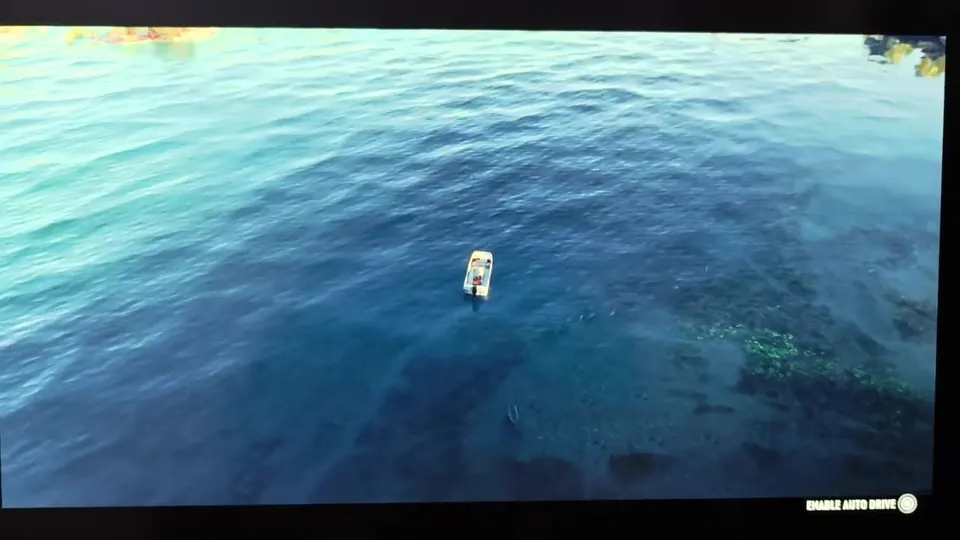
- Tap the accelerator (R2/RT) until the Enable Auto Drive prompt shows in the bottom-right corner.
- Hold Circle (PS5) or B (Xbox) to start auto-drive.
- Hold D-pad Down to stop and take the wheel back.
How do you turn on auto-drive in GTA 6?
Auto-drive runs through Cinematic view, and the game never points you to it. You need a waypoint and a moving vehicle before it will work.
- Open the map and place a waypoint somewhere you can drive to.
- Get in a vehicle (Triangle on PS5, Y on Xbox) and start driving.
- Hold D-pad Down and, while still holding it, press Options (PS5) or Menu (Xbox). The camera switches to Cinematic view.
- Tap R2/RT until the Enable Auto Drive prompt appears in the bottom-right corner.
- Hold Circle (PS5) or B (Xbox). Jason or Lucia now drives to your marker.
By default, auto-drive only works in safe situations. To use it during chases and escape missions too, open Settings > Gameplay, scroll down to the Accessibility section and set Auto Drive to Unrestricted.
What are the auto-drive controls?
| Action | PS5 | Xbox |
|---|---|---|
| Open Cinematic view | Hold D-pad Down, press Options | Hold D-pad Down, press Menu |
| Start auto-drive | Hold Circle | Hold B |
| Move the camera | Right stick | Right stick |
| Next camera view | Click R3 | Click RS |
| Go faster | R2 | RT |
| Slow down | L2 | LT |
| Exit | Hold D-pad Down | Hold D-pad Down |
The triggers step through three driving speeds, so you set how quickly your driver goes.
How well does auto-drive drive?
Your driver follows the road rules and waits at red lights. It’s a calm, safe ride, but a slow one, so skip it for timed missions. Busy traffic and crashes on the road can still slow you down, and the speed control helps if the trip drags.
It isn’t a shortcut. Your driver queues in traffic like everyone else, so auto-drive is best for sightseeing and grabbing screenshots or video of the trip. Move your waypoint at any time and the driver reroutes to the new spot. Auto-drive also won’t undo damage or trouble you got into before you switched it on.
In Cinematic view the camera cuts between side, overhead and front angles, which makes steering by hand awkward. When you want to drive yourself again, hold D-pad Down to leave it. You can still open photo mode from the pause menu to line up a shot, and you keep control of the radio.
Can you auto-drive a boat?
Yes. Auto-drive works in both land and water vehicles, and you can drop waypoints on the ocean and on lakes. On a boat it only steers through water it can actually travel. If your waypoint is on land, the boat gets as close as it can by water, then auto-drive switches off. It handles flying as well, so you can use it in aircraft too.
FAQ
Does auto-drive work on boats in GTA 6?
Yes. You can drop waypoints on the ocean and on lakes, and auto-drive steers the boat there through open water. If the marker sits on land, the boat gets as close as it can by water and then auto-drive switches off.
Does auto-drive obey traffic laws in GTA 6?
Mostly, yes. Your driver waits at red lights and sticks to the rules of the road. Heavy traffic and crashes can still slow the trip down.
Can you speed up auto-drive in GTA 6?
Yes. Press R2/RT to go faster and L2/LT to slow down while auto-drive is running. There are three speeds to pick from.
Why won't auto-drive turn on in GTA 6?
Make sure a waypoint is set and the vehicle is already moving. By default auto-drive only works in safe situations, so for chases and escape missions set Auto Drive to Unrestricted under Settings > Gameplay > Accessibility.