


Open the pause menu, go to Settings, then the UI tab: Language is the first option there. It changes menus and subtitles. Spoken dialogue is English in every version, so there's no separate audio language to switch. Text is available in English, French, Italian, German, Spanish, Brazilian Portuguese, Polish, Russian, Japanese, Korean and Chinese.
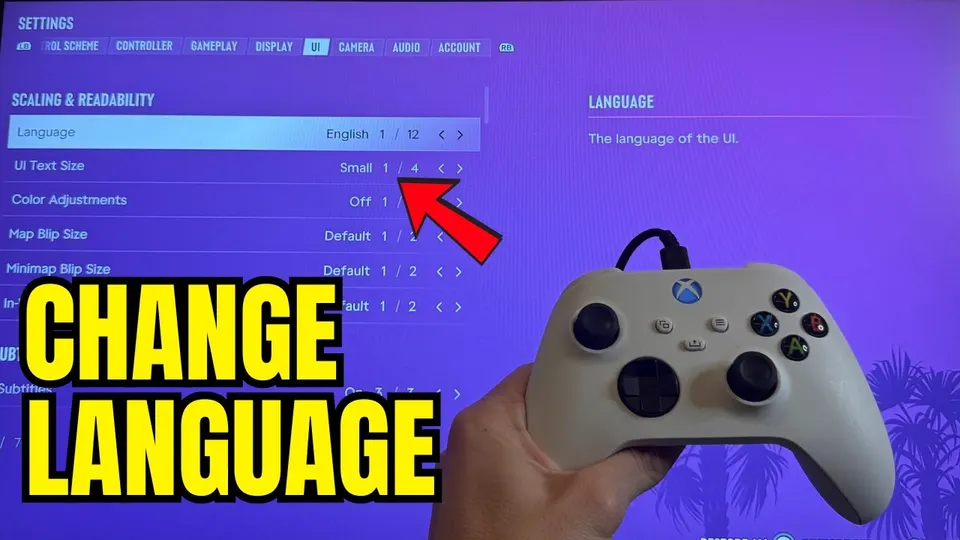
Step by step
- Pause the game and open Settings.
- Move to the UI tab.
- Select Language, the first option on that tab, and pick the one you want.
- In the same tab, set Subtitles, their size and background to taste.
Where is the language setting?
In the game, not on the console. Pause, open Settings and move to the UI tab. Language is the first option on it. Pick a language and the menus and subtitles switch over.
Menu in a language you can't read? The Settings tabs run Control Scheme, Controller, Gameplay, Display, UI, Camera, Audio, Account. UI is the fifth tab, and Language sits at the very top of it, above UI Text Size.
Which languages does GTA 6 support?
Menus and subtitles come in these languages:
- English US
- Français
- Italiano
- Deutsch
- Español Spain
- Español Mexico
- Português Brazil
- Polski
- Русский
- 日本語
- 한국어
- 简体中文 Simplified
- 繁體中文 Traditional
Voices are English only. Every version has the same English cast; other languages come through subtitles.
Hindi, Turkish, Arabic and other languages outside this list aren’t available.
Can you change the voice language?
No. There’s no audio language option, because spoken dialogue only exists in English. To follow the story in another language, set Language to it and keep Subtitles on. The default, Mission Only, shows text during missions; the UI tab also has options for subtitle size, speaker names and a background box that makes them easier to read.
How do you switch a Japanese PS5 to English?
If GTA 6 is showing Japanese, change it in the game: Settings > UI tab (fifth) > Language, then choose English.
Don’t try to fix it on the console if you have the Japan-only PS5 Digital Edition. That model only supports Japanese as the console language and only works with Japanese PlayStation accounts, so the system menus stay in Japanese. Game languages are separate, and GTA 6 has its own English option.
How do you change the console language?
Only if you want the whole system in another language:
| Console | Path | Note |
|---|---|---|
| PS5 | Settings > System > Language > Console Language | Not available on the Japan-only PS5 Digital Edition |
| Xbox Series X|S | Settings > System > Language & location | Restart the console afterwards |
For other options worth changing on the first launch, see the best graphics settings for GTA 6 and the best aim settings.
FAQ
Can you change the voice language in GTA 6?
No. All spoken dialogue is in English. Other languages are available for the menus and subtitles only.
My GTA 6 is in Japanese. How do I switch it to English?
Use the in-game setting: Settings, then the UI tab, then Language, the first option. On a Japan-only PS5 Digital Edition the console itself can only be set to Japanese, so the in-game option is the way to change it.
Is GTA 6 available in Hindi or Turkish?
No. Neither is in the supported language list.
Do I have to change my console language?
No. The in-game Language option works on its own, and it's the quickest fix.